Three permission modes
default asks, accept-edits auto-approves writes inside the working directory plus safe shell, plan removes every mutating tool from the schema and ends with an approve/continue gate. Cycle with ctrl+o.
koa-cli · 1.0 release candidate · private beta
koa-cli reads your repo, edits files, runs your tests and shows every change as a diff you approve before it is written. One engine behind a full-screen TUI, a headless JSON mode and an editor protocol.
It is one part of KOA, built with AI agents and used every day in the workspace it came from.
A real session
Unedited captures of the real TUI from 7 Oct 2026, run against a small demo repo (a token-bucket rate limiter with two planted bugs). The model was GLM-4.6 through the routing gateway. Nothing was mocked or retouched.
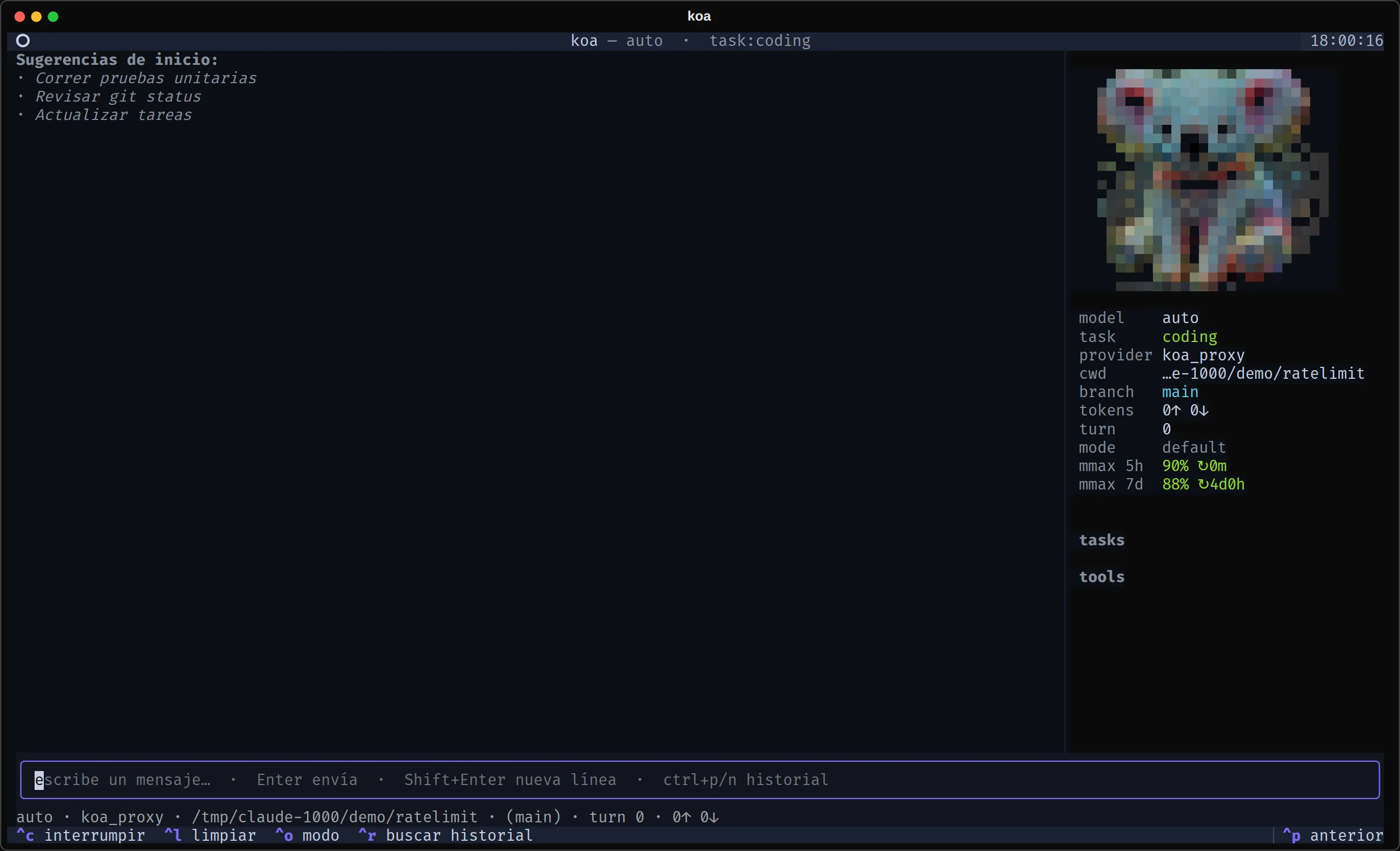
Start. The sidebar shows the routed model, task type, git branch, tokens and permission mode. The koala reacts to agent state.
01 · Asks before running
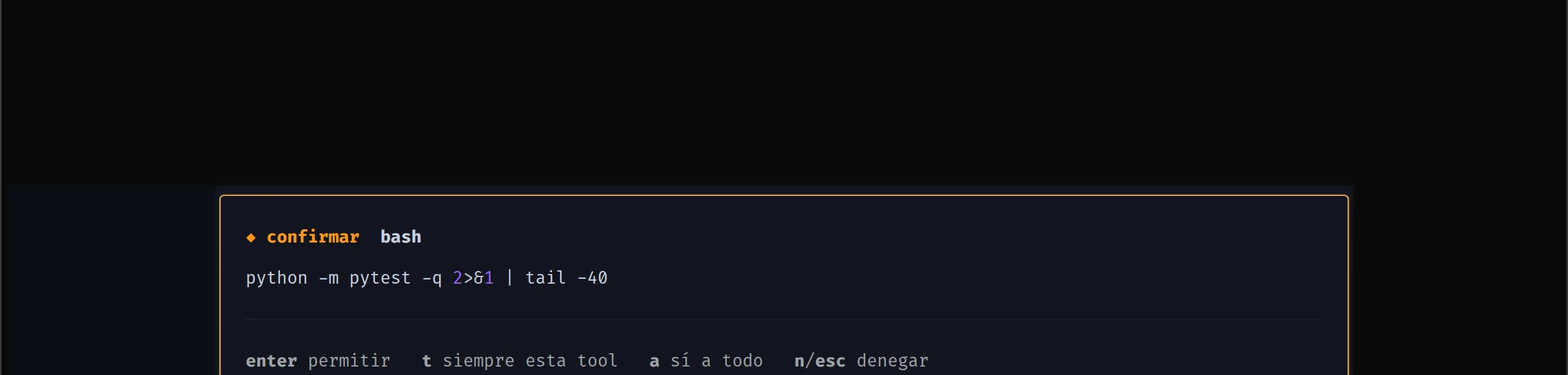
Shell commands need a keypress: enter once, t always for this tool, a yes to all, esc deny.
02 · Shows the diff
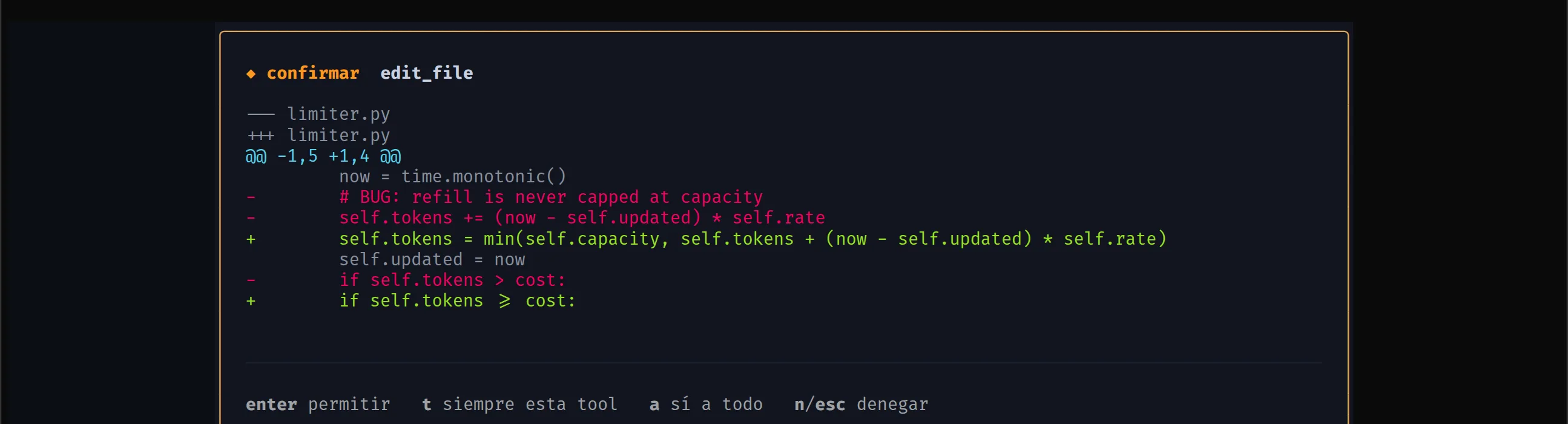
The agent found both root causes. The edit arrives as a diff, and nothing touches disk until you approve it.
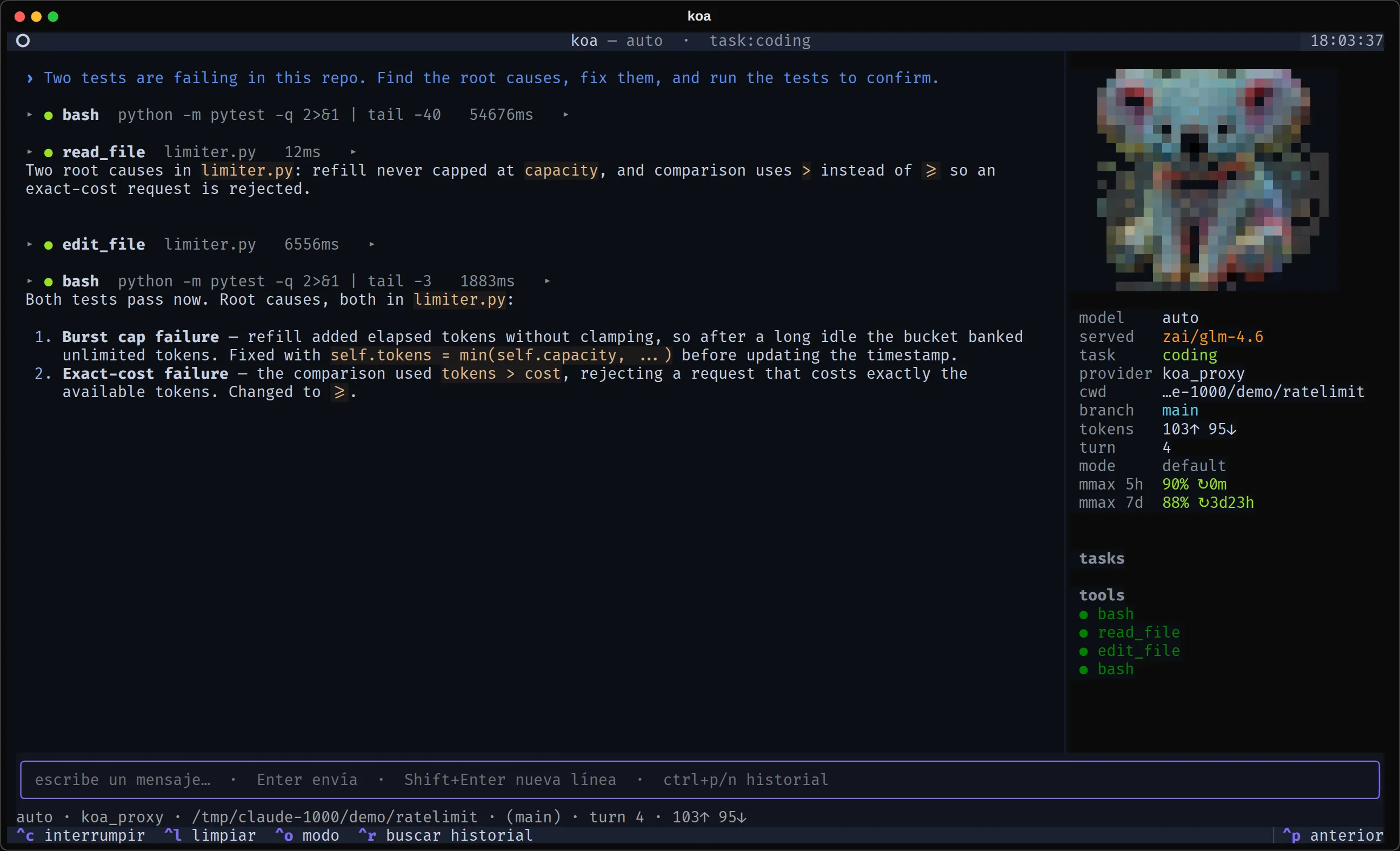
Finished. Tool cards collapse and carry timings; the summary names both causes. Running pytest by hand afterwards: both tests passed.
What it can do today
Everything below exists in the code and is covered by tests. Nothing here is a roadmap item.
The agent proposes; you decide. Each layer can be tightened independently.
default asks, accept-edits auto-approves writes inside the working directory plus safe shell, plan removes every mutating tool from the schema and ends with an approve/continue gate. Cycle with ctrl+o.
read_file emits content anchors; edit_file validates against them, so a stale view of a file cannot be silently overwritten. Falls back to normalized and fuzzy matching before giving up.
Events: PreToolUse, PostToolUse, Stop, SessionStart, SessionEnd, UserPromptSubmit, Notification. A hook that exits 2 blocks the call and its stderr becomes the reason shown to the model. Reads Claude Code–style settings.json.
--restricted drops the shell, disables MCP and confines writes. --bare and --safe-mode strip hooks, plugins, memory and config for troubleshooting. Secrets are redacted from hook payloads and session exports.
Caps on turns and repeated calls. A client-side budget gate degrades the model one step at warn, aborts with exit 3 at blocked, and --max-budget-usd caps a single session.
koa client <profile> loads one TOML: fixed model, spend cap, read-only HTTPS tools only, no shell, no memory. The loader fails closed: a profile that violates an invariant refuses to start.
Long sessions and big repos without the usual token bleed.
The task tool spawns a child engine with its own history; only the final report returns. Several read-only explore agents run in parallel.
Past 70% of the served model’s window, older turns are summarized and the last ten messages are kept verbatim. The saved session is untouched.
Merges .koa-cli/rules.md, AGENTS.md, CLAUDE.md, .cursor/rules and parent directories in a fixed precedence under a size budget. koa rules prints exactly what was loaded and what was dropped.
Consecutive read_file/grep/glob/web_* calls run concurrently. Oversized tool output is trimmed head and tail before it reaches the model.
@path autocompletes with Tab and is inlined at send. ctrl+v attaches a clipboard image through a vision route.
A local Markdown memory with search and write tools, injected as a budgeted index. Fully opt-out with one env var.
Plugs into the ecosystem instead of replacing it.
stdio and Streamable HTTP servers in three scopes (user, project, local). Remote servers authenticate via discovery, dynamic client registration and PKCE (RFC 9728, 8414, 7591, 8707).
deny_tools/allow_tools globs and "lazy": true keep unused tool schemas out of every call, which cuts the base tokens each request carries.
SKILL.md, .koa-cli/commands/*.md and .koa-cli/agents/*.md, and it also reads the .claude/ equivalents. A file agent can only narrow the parent’s tool allowlist, never widen it.
Providers, tools and hooks register through one registry; built-ins and plugins are peers. Adding a provider means registering two conversion functions.
Anthropic, OpenAI-compatible, Gemini, GLM and MiniMax built in, Ollama and OpenRouter as plugins, plus a fallback chain and a routing gateway that picks a model per task type.
A streaming ThinkStripper handles tags split across chunks and routes thinking to a dimmed, collapsible channel instead of the reply.
Same engine, different front ends.
Textual-based: token streaming, markdown and syntax highlighting, collapsible tool cards, a live task panel, multi-line prompt, ctrl+k palette, three themes.
koa acp speaks the Agent Client Protocol over stdio for Emacs agent-shell and Zed: permission dialogs with inline diff, session resume, and reads of unsaved editor buffers.
Runs in an eat terminal with truecolor and mouse, with commands to send a region or buffer to the prompt.
Append-only JSONL. --resume, sessions export (redacted, portable JSON), sessions fork --at-turn N, and background sessions you can attach to later.
Headless, for scripts and CI
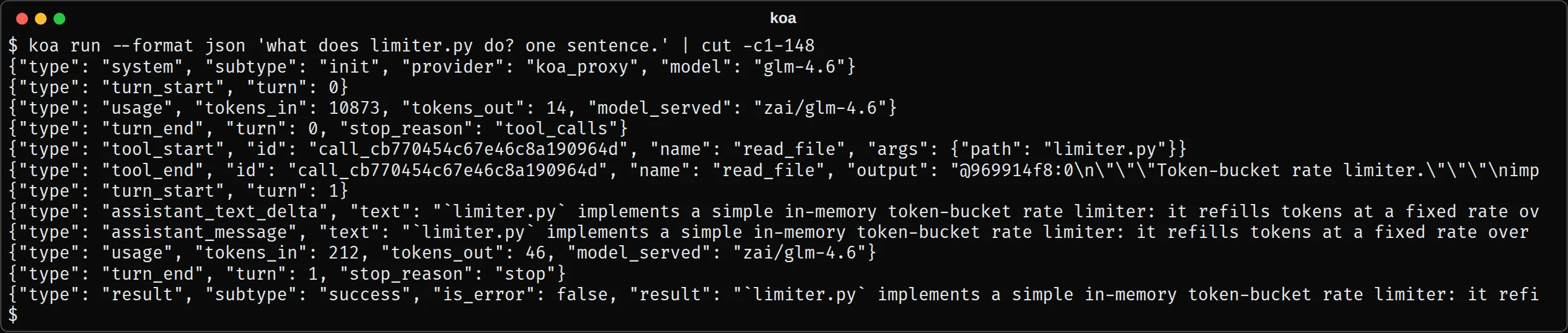
koa run streams newline-delimited JSON events, ends with a typed result, and exits with a code a CI runner can branch on. Below, a real run: the agent reads the file, answers, and emits a success result. In JSON mode the shell tool is denied unless --yolo is passed.
| Exit | Meaning | result.subtype |
|---|---|---|
| 0 | ok | success |
| 2 | tool, loop or schema error | error_schema_validation · error_loop_guard · error_stall |
| 3 | budget blocked | error_budget |
| 4 | provider exhausted after retries | error_provider |
| 130 | Ctrl-C | none |
--json-schema forces the final answer to conform to a schema and retries with the validation error as feedback. --input-format stream-json accepts one message per line on stdin for multi-turn automation.
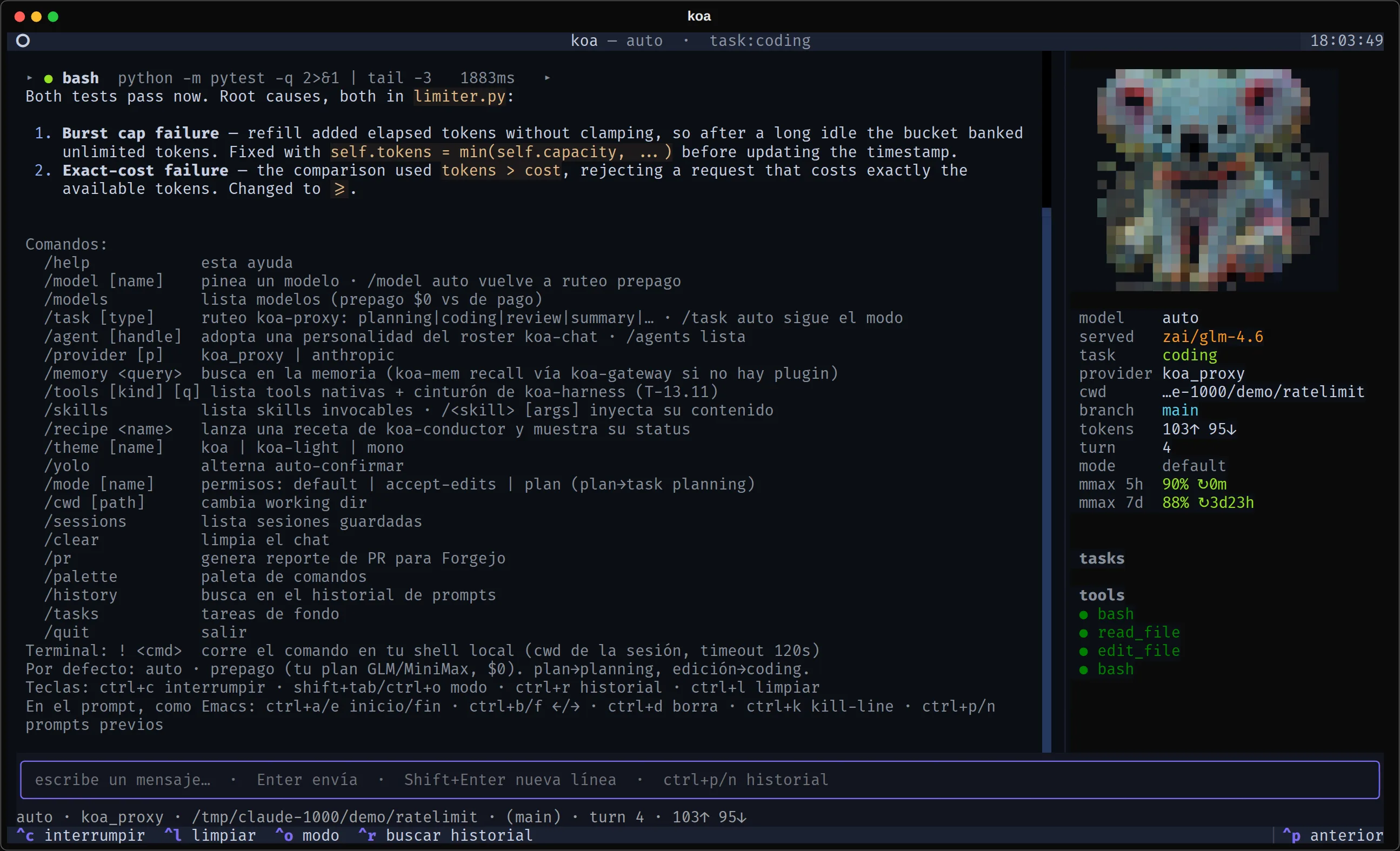
The slash commands. The interface in these captures is in Spanish because it was first built for an internal workspace; localization is on the list.
Recent work
edit_file for malformed payloads from weaker models OctHow it gets built. KOA Labs works with AI agents, inside a fixed process: each change starts as a plan item, gets an isolated git worktree, lands through a pull request, and passes a review before merge. Several tasks went through more than one round of review fixes before they landed.
koa-cli is also one of the tools that does that work, so every rough edge is felt first by the people building it. That is a fast feedback loop for making a developer tool better.
Status and access
koa-cli is in private beta. It is not on PyPI yet and the source is not public. KOA Labs can demo it live or walk through the code: write to hola@koalabs.ai.
koa-cli is one part of KOA. The open core of KOA is koalabs-ai/koa (MIT): to-dos, plans, memory, claims and an MCP server for working with AI agents on your own machine.
koa-cli is an independent project by KOA Labs. It is not affiliated with, endorsed by, or sponsored by Anthropic, OpenAI, Google, Zhipu, MiniMax, or any other model provider. Product names are used only to describe compatibility. Screenshots show a demo repository created for this page.